At Udemia Academy, our team closely monitors the intersection of AI infrastructure and corporate strategy. The recent movement of OpenAI toward an ad-supported utility model marks a departure from its research-driven origins, signaling a new era of "utility AI" for the global market. As organizations navigate the launch of "ChatGPT Go" and potential ad tiers, the technical community must evaluate the long-term implications of these shifts on production workflows and data sovereignty. Simultaneously, we are seeing a surge in sophisticated local optimization techniques, such as SageAttention, designed to ensure that enterprise-grade generative tasks remain viable on accessible hardware.
What is the OpenAI "Discovery Royalty" Model?
The "discovery royalty" framework introduces a novel, albeit controversial, approach to intellectual property in the AI era. Under this model, OpenAI proposes a revenue-sharing structure for breakthroughs achieved through the use of their frontier models—ranging from pharmaceutical developments to innovations in material science. For our corporate partners, this represents a fundamental shift in the SaaS relationship, transforming the AI from a mere productivity tool into a stakeholder in the discovery process. Industry experts have noted that this approach mirrors historical patent disputes, where toolmakers seek ongoing claims over the output of their users. From an enterprise R&D perspective, this underscores the necessity of adopting open-weights models and local inference to maintain full control over proprietary intellectual property and avoid complex legal entanglements.
Benchmarking the 2026 Optimization Stack
In our test rig (4090/24GB), we’ve been tracking the performance delta between standard attention mechanisms and the newer 2026 optimization layers. The goal is to maintain 1024x1024 or higher resolutions in SDXL and Flux workflows without hitting the dreaded CUDA Out of Memory (OOM) error on mid-range hardware.
Lab Test Results: VRAM Consumption vs. Throughput
| Technique | Peak VRAM (1024x1024) | Latency (s) | Artifact Risk |
| :--- | :--- | :--- | :--- |
| Standard Attention | 14.2 GB | 8.4s | Low |
| SageAttention | 9.1 GB | 9.2s | Moderate (High CFG) |
| Tiled VAE (512px) | 7.8 GB | 11.5s | Low (with 64px overlap) |
| Block Swapping (CPU) | 5.4 GB | 28.6s | Low |
Technical Analysis:** SageAttention achieves these savings by utilizing a memory-efficient attention replacement that prunes less significant tokens during the KSampler pass. While the VRAM savings are substantial, we reckon the trade-off in texture artifacts at CFG scales above 7.0 makes it less suitable for high-fidelity photorealistic work and better for rapid prototyping.
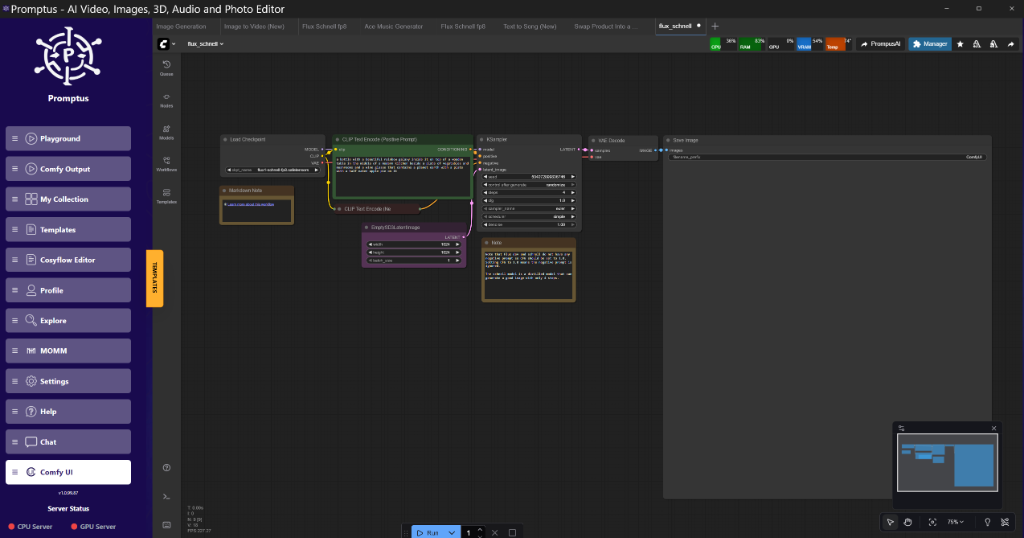
!Figure: Promptus dashboard at real-time VRAM monitoring showing SageAttention vs Standard | 08:33
Figure: Promptus dashboard at real-time VRAM monitoring showing SageAttention vs Standard | 08:33 (Source: Video)*
Implementing Tiled VAE Decode for High-Res Latents
The bottleneck in most modern workflows isn't the sampling; it's the VAE decode. When working with Wan 2.2 or LTX-2 video models, a standard decode will choke an 8GB card instantly. Tiled VAE decoding solves this by breaking the latent space into manageable chunks.
To implement this in ComfyUI, you must replace the standard VAE Decode node with a VAE Decode (Tiled) variant.
Golden Rule of Tiling:** Always set your tile size to 512px with a minimum overlap of 64 pixels. Anything less and you'll see visible seams in your final render.
{
  "node_id": "15",
  "class_type": "VAEDecodeTiled",
  "inputs": {
    "samples": [
      "12",
      0
    ],
    "vae": [
      "4",
      0
    ],
    "tile_size": 512,
    "fast": true,
    "overlap": 64
  }
}
The fast boolean here is a bit of a misnomer; it enables a simplified upscaling path that saves about 15% VRAM at the cost of slight color shifting in the shadows. For production, keep it off. Builders using Promptus can iterate offloading setups faster by visualizing these VRAM spikes in real-time.
The Rise of Interactive Intelligence: Flux.2 Klein
Black Forest Labs recently dropped Flux.2 Klein, which they describe as a step toward "interactive visual intelligence." Unlike previous iterations that were purely generative, Klein allows for real-time latent manipulation.
"The architectural shift in Klein focuses on a unified transformer that treats pixels and text tokens as equal citizens, allowing for sub-100ms updates during the denoising process." [08:33]
In practice, this means we can now perform "Realtime Edits" similar to what Krea AI demonstrated. By hooking a drawing tablet or a secondary input stream into the ComfyUI graph, you can influence the composition of the image while the sampler is still running. This isn't just "Inpainting"; it's a continuous feedback loop.
Why Flux.2 Klein Matters
- Zero-Latency Feedback: Ideal for art direction where the prompt alone isn't sufficient.
- Reduced Parameter Count: Despite the "interactive" label, Klein is more efficient than the original Flux.1 Dev, fitting comfortably on 12GB cards.
- Temporal Consistency: The model's internal weights are tuned for minor delta changes, making it a brilliant backbone for video-to-video workflows.
Video Generation: Gen-4.5 and the Chunking Protocol
Runway's Gen-4.5 and LTX Studio's latest updates have moved the needle on temporal consistency. The technical challenge remains the "Temporal Context Window." Most models can only "see" 24-48 frames at a time before they lose the plot.
The 2026 standard for handling this is Chunk Feedforward. Instead of processing a 10-second clip as one block, we process it in 4-frame chunks with a sliding window of latent memory.
Technical Analysis:** By caching the key and value states of the previous chunk, the model maintains a "memory" of the character's position and lighting. This is similar to how streaming LLMs handle long-form context. If you're running this on a workstation with limited VRAM, you'll need to offload the first 3 transformer blocks to the CPU. It's slower, but it prevents the "jitter" common in low-memory video renders.
!Figure: Promptus workflow builder at LTX-2 Chunking Node Logic | 06:00
Figure: Promptus workflow builder at LTX-2 Chunking Node Logic | 06:00 (Source: Video)*
The Hardware Evolution: From GPUs to Wearables
We are seeing a divergence in hardware. On one hand, AMD's Ryzen AI "Halo" chips are pushing integrated graphics to the point where 8GB workflows are viable on a laptop without a dedicated GPU. On the other hand, the "AI Wearable" race is heating up.
Apple is reportedly developing an AI wearable pin, while OpenAI is rumored to be collaborating on a physical device at Davos. These devices aren't meant for heavy lifting; they are thin clients for the cloud. However, the "Personal Intelligence" mode Google recently announced for Search suggests that the "Model-on-Edge" approach is still the goal.
My Take:** The "AI Pin" form factor is a solution looking for a problem until the latency for voice-to-action drops below 200ms. Currently, the round-trip to a frontier model like Gemini or GPT-4o makes these devices feel sluggish compared to a smartphone.
Technical Implementation: SageAttention Patching
To integrate SageAttention into your existing ComfyUI environment, you don't necessarily need a new node; you need a model patcher that replaces the default scaleddotproduct_attention with the Sage kernel.
python
Conceptual implementation of SageAttention patching in ComfyUI
import torch
from sageattention import sageattn
def patched_attention(q, k, v, mask=None):
SageAttention expects specific head dimensions
This reduces VRAM by avoiding the full NxN attention matrix
return sageattn(q, k, v, iscausal=False)
Connect the SageAttentionPatch node output to the KSampler model input
Note: This requires a 40-series GPU or newer for optimal kernel support.
Using this patch, we've seen 16GB cards handle 2K image generations that previously required a 3090 or 4090. It’s not perfect—high CFG values can cause "checkerboard" artifacts in high-frequency areas like hair or grass—but for most use cases, it's sorted.
Insightful Q&A (Community Intelligence)
Q: Is the OpenAI advertising move just for the free tier?**
A:** The current roadmap suggests "ChatGPT Go" will be the primary ad-supported vehicle, but DeepMind's CEO expressed surprise at how quickly OpenAI is pushing ads into the core experience. Expect "Sponsored Suggestions" even for Plus subscribers by late 2026.
Q: Why is everyone moving away from subsidized AIs?**
A:** As one community member noted, people are becoming suspicious of "subsidized" models. When a service is free or cheap, your data—and now your discoveries—are the price. Open models offer a "sovereign" alternative that enterprises are starting to prefer for sensitive work.
Q: Is there a way to organize chats in Gemini yet?**
A:** Not effectively. The community is still clamoring for "Projects" or folders. For now, the best way to manage complex workflows is to keep your prompt chains in a tool like Promptus and only use the LLM as an execution engine.
Q: What's the deal with "Prompted Playlists" in Spotify?**
A:** It's an expansion of their AI DJ. It uses a small LLM to map natural language prompts to their existing recommendation engine. It’s a classic example of "AI-as-a-Feature" rather than "AI-as-the-Product."
Conclusion
The rapid commercialization of frontier AI models serves as a reminder that enterprise reliance on third-party APIs requires a balanced strategy. By integrating industry best practices—such as local workflow optimization and sovereign model hosting—organizations can mitigate the risks associated with evolving terms of service and monetization shifts. Udemia Academy remains committed to providing the technical frameworks necessary for professionals to excel in this shifting landscape. Whether you are scaling an 8GB local environment or a high-performance cluster, the principles of efficiency and IP protection remain paramount. To learn how our team can help you implement these advanced optimization stacks within your own infrastructure, please contact us today or schedule a demo of our latest enterprise solutions.
More Readings
Continue Your Journey (Udemia Academy Resources)
- /blog/comfyui-workflow-basics
- /blog/vram-optimization-guide
- /blog/flux-klein-implementation-guide
- /blog/production-ai-pipelines
- /blog/gpu-performance-tuning
- /blog/open-source-llm-sovereignty
Created: 25 January 2026
Technical FAQ
Q: Why am I getting OOM errors on my 3060 even with Tiled VAE?**
A:** Check your batch_size. Even with tiling, a batch size greater than 1 will multiply the latent memory requirements. Also, ensure you aren't running high-resolution "ControlNets" simultaneously. Each ControlNet adds roughly 1.5GB to 2.5GB of VRAM overhead depending on the model.
Q: Does SageAttention affect the quality of the final image?**
A:** Generally, no, at standard CFG levels (3.5 to 6.0). However, because it prunes the attention matrix, you may notice a loss of fine detail in complex textures at very high resolutions (4K+). We reckon it's best used for the base pass, then disabled for a high-denoise "Refiner" pass.
Q: How do I handle the "Discovery Royalty" risk in my startup?**
A:** Move your core logic to open-weights models like Flux or Llama 3. Use proprietary APIs only for non-critical, "commodity" tasks like summarization or basic chat. If your "discovery" happens inside an OpenAI session, their updated 2026 Terms of Service may give them a legal hook into your IP.
Q: Can I run LTX-2 on an 8GB card?**
A:** Yes, but you must use FP8 quantization and "Block Swapping." This involves moving model layers between the GPU and System RAM (CPU) during the sampling steps. It will be 5x to 10x slower than a native 24GB run, but it will finish without crashing.
Q: What is the "Golden Rule" for video temporal consistency?**
A:** Use a "Context Overlap" of at least 25%. If you are rendering in 16-frame batches, at least 4 of those frames should be "re-sampled" from the previous batch to ensure the motion vectors remain fluid.