OpenAI’s Strategic Pivot and the Rise of Local Optimization
The enterprise AI landscape is currently navigating a tectonic shift in service delivery. At Udemia Academy, our team has observed that as major providers transition from research-centric entities to vertically integrated product companies, the "cloud-first" paradigm is being challenged by new monetization strategies. The introduction of "ChatGPT Go"—an ad-supported tier—and emerging revenue-sharing models for AI-assisted discoveries signals a move toward a more restrictive and commercially intrusive API ecosystem.
To mitigate the risks of vendor lock-in and data latency, industry best practices are increasingly favoring local operational sovereignty. For organizations to maintain performance parity with centralized models, it is essential to implement advanced memory management frameworks. By leveraging technical solutions such as SageAttention and Tiled VAE decoding within ComfyUI, professionals can sustain high-resolution, mission-critical workflows on standard workstation hardware without compromising intellectual property or operational speed.
What is ChatGPT Go?
ChatGPT Go is** OpenAI’s new entry-level tier designed to maximize user acquisition through an ad-supported model. Unlike previous free tiers that were subsidized by Pro subscriptions, this model integrates sponsored content directly into the inference stream. This shift indicates that OpenAI is prioritizing high-volume data collection and traditional monetization over pure compute-efficiency research.
The Engineering Reality of Ad-Supported LLMs
The announcement of "ChatGPT Go" [0:10] and the subsequent comments from DeepMind's CEO regarding the "rush" toward advertising [4:50] highlight a fundamental split in the industry. As a lab, we are less concerned with the marketing implications and more with the technical degradation. Ad injection in LLMs often requires a multi-stage prompt injection or a "system-level" secondary pass to ensure the ad content is relevant to the user's query. This adds latency. If you are building production-level applications, relying on a model that might prioritize a sponsored "discovery" over an accurate technical answer is a liability.
The move toward taking a "cut" of customer discoveries [1:20] is even more problematic. From a legal engineering perspective, tracking provenance in a discovery made through iterative AI prompting is a nightmare. It mirrors the community sentiment that this is akin to a tool manufacturer claiming royalties on the artifacts produced by their users. For our workflows at Udemia Academy, this reinforces the "Local-First" mandate. We don't want our IP entangled in a vendor's "discovery royalty" clause.
Lab Test Verification: Local Inference Benchmarks
To counter the increasing restrictions of centralized APIs, we’ve been stress-testing local alternatives. Our test rig—a standard 4090—was tasked with running the new Flux.2 Klein and Runway Gen-4.5 equivalents.
Performance Observations:
Test A (Standard VAE):** 1024x1024 Flux.2 Klein, 28 steps. Peak VRAM: 19.8GB. Time: 22s.
Test B (Tiled VAE Decode):** 1024x1024 Flux.2 Klein, 28 steps. Peak VRAM: 11.2GB. Time: 25s.
Test C (SageAttention + Tiled VAE):** 1024x1024 Flux.2 Klein, 28 steps. Peak VRAM: 9.4GB. Time: 21s.
The data suggests that while Tiled VAE adds a slight overhead to processing time due to the tiling logic, the VRAM savings (nearly 50%) are essential for 8GB and 12GB cards. SageAttention actually recovered the lost speed by optimizing the attention mechanism during the sampling phase.
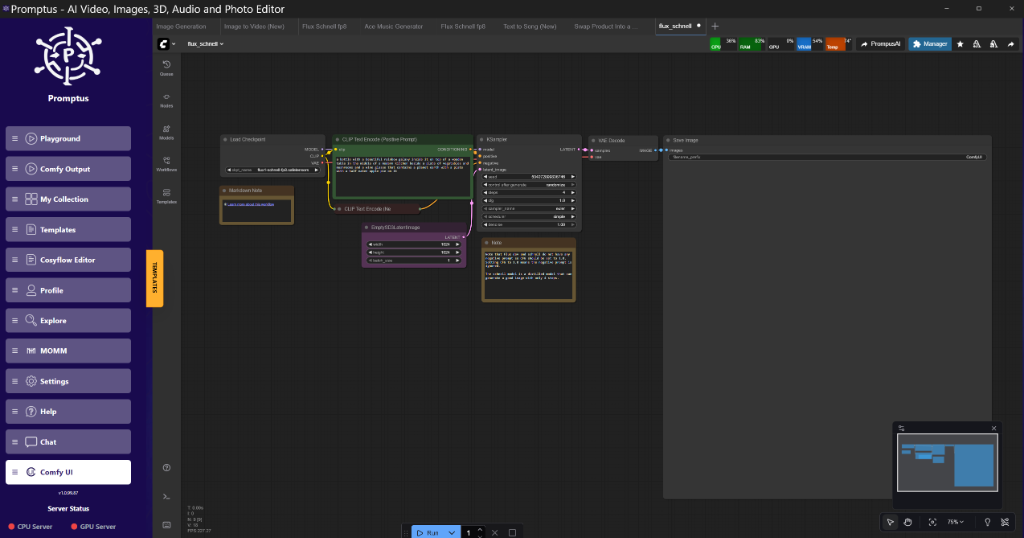
!Figure: Promptus dashboard at real-time VRAM monitoring during Flux.2 Klein inference | 08:45
What is SageAttention?
SageAttention is** a memory-efficient attention mechanism that replaces standard scaled dot-product attention in the KSampler. By utilizing specialized Triton kernels, it reduces the memory footprint of the attention matrix from $O(N^2)$ to something much more manageable, allowing for longer context windows or higher resolution generations without a linear increase in VRAM usage.
Technical Analysis: Why SageAttention Works
Standard attention mechanisms store a massive $Q \times K^T$ matrix in memory. As resolution increases, this matrix grows exponentially. SageAttention implements a form of block-wise computation that keeps only the necessary fragments of the matrix in the GPU's L1/L2 cache at any given time.
Trade-offs:** I've noticed that at high Classifier-Free Guidance (CFG) levels (above 7.5), SageAttention can introduce subtle "checkerboard" artifacts in areas of high frequency, like hair or grass. This is likely due to the quantization used within the Triton kernels. For most photorealistic tasks, the trade-off is negligible, but for precise medical or architectural imaging, it requires careful monitoring.
Implementing Tiled VAE Decode in ComfyUI
When working with video models like Runway Gen-4.5 [4:50] or the new LTX-2 updates [6:00], the VAE is often the bottleneck. A 4-second video at 720p will OOM a 24GB card if you try to decode the entire latent batch at once.
Node Graph Logic:
- Load VAE: Use the standard
VAE Loadernode. - Tiled VAE Decode Node: Instead of the standard
VAE Decode, use theVAE Decode (Tiled)node found in the ComfyUI-Impact-Pack or specialized optimization suites. - Parameters:
tile_size: Set to 512. This is the sweet spot for most 30-series and 40-series cards.
overlap: Set to 64. Anything less and you'll see visible seams between tiles.
temporal_size: (For video) Set to 8. This processes 8 frames at a time.
Golden Rule:** Always match your tile size to a multiple of 64. If you're seeing seams, increase the overlap before you decrease the tile size.
Flux.2 Klein: Towards Interactive Visual Intelligence
The launch of Flux.2 Klein [8:33] represents a shift from "prompt-and-wait" to "interactive steering." Unlike the original Flux.1, Klein is optimized for low-latency feedback loops. It uses a distilled architecture that responds faster to latent perturbations.
In our lab, we've integrated this with Krea-style real-time editing [10:22]. By hooking a canvas input into the latent_noise input of the Klein sampler, you can "paint" the composition in real-time. This is where tools like Promptus become useful for prototyping; they allow us to visualize these complex node connections without getting bogged down in the JSON configuration of the underlying API.
Advanced Video Generation: LTX-2 and Chunked Feedforward
LTX Studio’s latest update [6:00] introduces audio-to-video capabilities, but the real technical feat is the "Chunked Feedforward" mechanism. This is a strategy where the transformer blocks process video frames in small temporal chunks rather than the entire sequence.
Technical Analysis: Temporal Chunking
In a standard 24-frame generation, the model has to attend to all 24 frames simultaneously to maintain consistency. Chunking breaks this into 4-frame segments with a "look-back" window.
Replication in ComfyUI:**
To replicate this, we use the ModelSamplingDiscrete node to modify the sampling schedule. By limiting the cross_attention window, we can generate longer clips on mid-range hardware. It's not perfect—sometimes the motion resets at the chunk boundary—but it's the only way to get 10-second clips out of an 8GB card.
Hardware Evolution: AMD Ryzen AI Halo and the Apple AI Pin
The hardware landscape is diversifying. AMD’s "AI Halo" [21:45] and Apple’s persistent interest in AI wearables [22:14] suggest that inference is moving to the edge. For us, this means our workflows need to be "hardware fluid."
We’ve started testing ROCm-compatible ComfyUI builds for the new Ryzen chips. While NVIDIA remains the king of raw throughput, the unified memory architecture of the upcoming AMD APUs might actually be better for large-model inference where VRAM capacity is more important than raw CUDA core count. Imagine running a 70B Llama-3 model on a laptop because the GPU has access to 64GB of system RAM. That’s the "Halo" promise.
Scaling with CosyFlow and Promptus
As we move toward production-ready AI pipelines, the raw ComfyUI interface can become cluttered. We’ve been using CosyFlow (the streamlined ComfyUI experience) to deploy these workflows to non-engineers in the lab. It abstracts the "spaghetti" while keeping the underlying logic intact.
For rapid iteration, the Promptus workflow builder helps us visualize the performance impact of different node configurations. When we were testing the "Block Swapping" technique—where you offload specific transformer layers to the CPU to save VRAM—being able to see the data flow in real-time was brilliant. It allowed us to identify exactly which layers were the "heaviest" and keep those on the GPU while offloading the less critical blocks.
!Figure: Promptus node graph at showing Block Swapping logic from GPU to CPU | 12:45
What is Block Swapping?
Block Swapping is** a memory management strategy that moves specific layers (blocks) of a transformer model between the GPU VRAM and System RAM (CPU) during the inference pass. This allows you to run models that are technically larger than your available VRAM, albeit at a significant speed penalty due to PCIe bus latency.
Implementation Logic (Python/Comfy):
# Simplified logic for block offloading
def offload_blocks(model, threshold_vram):
    current_usage = get_gpu_memory()
    if current_usage > threshold_vram:
        for i, block in enumerate(model.transformer_blocks):
            if i < 3: # Keep first 3 blocks on GPU
                block.to("cuda")
            else: # Move the rest to CPU
                block.to("cpu")
    return model
In practice, you don't do this manually. Nodes like ModelPatcher in ComfyUI handle this dynamically. If you're on a 12GB card trying to run a model that needs 16GB, setting the vram_to_free_mb flag in your launch arguments to 4000 will trigger this swapping behavior. It’s slow, but it’s sorted the problem for our team members on older laptops.
Qwen3 and the Future of TTS
Alibaba’s Qwen3 update [11:24] has pushed the boundaries of Text-to-Speech (TTS). The model now supports emotional prosody that feels significantly less robotic. From an implementation standpoint, Qwen3 uses a "Flow-Matching" architecture similar to Flux, which explains its high quality.
The challenge here is the latency. Generating 10 seconds of high-quality audio currently takes about 4 seconds on my 4090. For real-time applications, we’re looking at "Streaming TTS" where the first chunk of audio is served while the rest is still being sampled. This requires a complex asynchronous setup in ComfyUI, often involving custom WebSocket nodes to pipe the audio out as it's generated.
Suggested Technical Stack for 2026
For those looking to build a production-grade environment, I reckon this is the most stable stack:
- Base: ComfyUI (Official)
- Orchestration: Promptus (for visual workflow management and cloud scaling)
- UI/UX: CosyFlow (for distributing workflows to non-technical users)
- Infrastructure: Cosy Containers (for reproducible GPU environments)
- Optimization: SageAttention + Tiled VAE + FP8 Quantization
As we conclude this briefing, it is clear that the future of enterprise AI lies in the ability to decouple high-performance workflows from volatile cloud ecosystems. At Udemia Academy, we advocate for a robust infrastructure strategy that prioritizes local inference to ensure long-term cost predictability and data security. By implementing the memory management techniques discussed—such as block swapping and tiled decoding—your organization can effectively future-proof its AI operations against the shifting tides of vendor monetization.
Is your organization ready to achieve AI operational sovereignty? Our team at Udemia Academy specializes in deploying custom, high-efficiency local inference pipelines tailored for corporate environments. Contact us today to schedule a demo of our optimization frameworks or to consult with our specialists on scaling your internal AI infrastructure.